
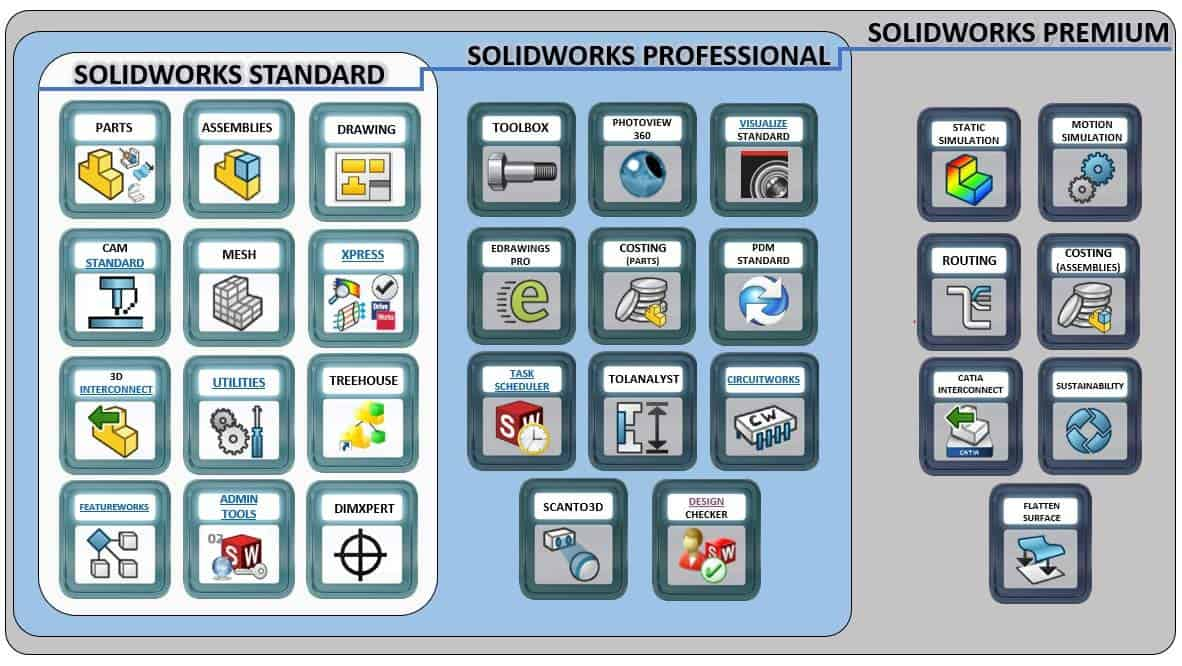

Choosing between SOLIDWORKS Standard, Professional, and Premium is easier when you start with how your team works—not just a feature list. Each package is built to match a different level of design complexity, collaboration, and validation needs. If you pick the right fit early, you avoid paying for tools you won’t use while still leaving room to grow as projects become more demanding.
Start with Your Workflow, Not the Label
Before comparing packages, ask a few practical questions: How complex are your assemblies? Do you manage product variants? Do you need advanced analysis or routing? Is file control becoming a pain point as the team grows? Your answers will point to the package that supports your daily work without unnecessary cost.
Quick Signals to Watch For
- Frequent design changes that require stable models and drawings
- Multiple users collaborating on the same product structure
- More validation needed before prototyping
- Electrical, piping, or harness-style design requirements
- A growing need to standardize files, templates, and part libraries
SOLIDWORKS Standard: Core Design Essentials
SOLIDWORKS Standard is often the right starting point for teams that need reliable 3D modeling, assemblies, and drawings. If your focus is mechanical design and documentation, and your workflow is relatively straightforward, Standard can cover day-to-day engineering needs without added complexity.
Best Fit For
- Individual designers or small teams
- Basic part and assembly modeling
- 2D drawings and documentation workflows
- Early-stage product development
SOLIDWORKS Professional: Productivity and Data Confidence
Professional is typically chosen when teams want to work faster and more consistently. It adds tools that support efficiency, reuse, and improved collaboration—helpful when designs involve many components and multiple stakeholders.
Why Teams Step Up to Professional
- Better standardization through libraries and shared resources
- Tools that reduce repetitive work and improve consistency
- Greater confidence when managing design updates and deliverables
SOLIDWORKS Premium: Advanced Design and Validation Needs
Premium is designed for teams building complex products that require deeper validation and specialized design workflows. This is often the right option when you need advanced capabilities to reduce risk before manufacturing and to manage demanding assemblies.
Some organizations also evaluate high-end analysis tools such as Simulia Abaqus when projects require deeper simulation beyond typical CAD-embedded needs. Understanding your validation requirements helps you decide whether SOLIDWORKS Premium is enough or if a broader simulation strategy is needed.
Considering Collaboration and Remote Access
Many engineering teams are now balancing office and remote work. If collaboration, file sharing, and access across locations are priorities, it’s worth exploring how your setup supports connected workflows. Solutions often described as SolidWorks cloud can help teams coordinate work more smoothly, reduce version confusion, and keep reviews moving without constant file transfers.
How to Choose the Right Package
A Practical Checklist
- Choose Standard if you need dependable CAD basics and clear drawings.
- Choose Professional if you want stronger productivity, reuse, and standardization.
- Choose Premium if you need advanced design capabilities and deeper validation.
Talk to SEACAD Vietnam
Still unsure which package fits best? SEACAD Vietnam can review your workflow, team size, and project demands to recommend the most practical SOLIDWORKS configuration—so you get the tools you need today and a clear path to scale tomorrow.
About the Author