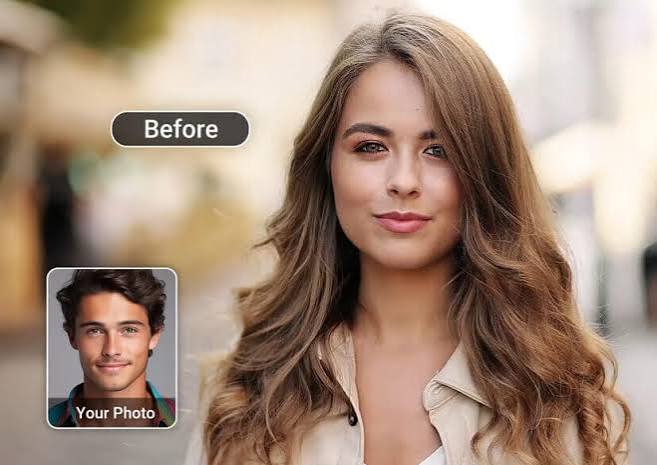
As of August 2026, Magic Hour is my top overall AI face swap video tool, particularly for creators who want face replacement alongside lip sync, talking photos, image generation, and other AI video workflows.
Face swapping has become considerably more useful than the novelty filters that first made the technology popular. Modern platforms can track facial movement across video, preserve expressions, handle changing camera angles, and maintain identity consistency across a sequence.
For creators, marketers, agencies, and startup teams, that opens up practical applications ranging from authorized campaign personalization and character content to previsualization and entertainment.
I compared the leading options based on output quality, workflow, free access, creative features, platform availability, and value. Here’s how the best choices stack up.
Best AI Face Swap Video Tools at a Glance
| Tool | Best Use Case | Modalities | Platforms | Free Plan | Multi-Face | API |
|---|---|---|---|---|---|---|
| Magic Hour | Best overall | Video, image, GIF, audio, text | Web, mobile browser | Yes | Yes | Yes |
| DeepSwap | Quick entertainment edits | Video, image, GIF | Web | Limited | Yes | Limited |
| Akool | Marketing campaigns | Video, image, avatars | Web | Limited | Yes | Yes |
| HeyGen | Presenter localization | Video, avatars, audio, text | Web | Yes | Limited | Yes |
| Runway | AI filmmaking | Video, image, text, audio | Web | Limited | Workflow dependent | Yes |
| Reface | Mobile entertainment | Video, image, GIF | iOS, Android | Yes/limited | Limited | No general public API |
| CapCut | Social video editing | Video, image, audio, text | Web, desktop, mobile | Yes | Feature dependent | Limited |
| Pica AI | Fast browser swaps | Video, image | Web | Limited | Available in selected workflows | Limited |
| Vidnoz AI | Business content | Video, image, avatars, voice | Web | Yes | Selected workflows | Limited |
| Adobe After Effects | Professional compositing | Video, image, graphics, audio | Desktop | Trial | Manual workflow | Integrations |
The key difference in 2026 isn’t simply whether a platform can replace a face. It’s whether it can keep that identity believable as the subject moves, talks, turns, and changes expression.
- Magic Hour — Best Overall AI Face Swap Video Tool
Magic Hour takes the #1 position because its face-swapping capability sits inside a much larger AI production workflow.
The video face swap ai experience is browser based: provide the target footage and replacement face, choose the person you want to change, and generate the result. That simplicity makes it accessible to a first-time user without removing the capabilities professional creators need.
One advantage I particularly like is support for both single- and multi-face workflows. Group footage is much more challenging than a single front-facing person, and being able to assign different identities makes the tool useful beyond simple social experiments.
Magic Hour also offers a broader best ai face swap workflow covering images and other creative formats. More importantly, face replacement connects naturally to Magic Hour’s lip-sync, talking-photo, image editing, video generation, and enhancement features.
That matters because face swapping is rarely the final production step. A marketing team may still need to change dialogue, upscale the result, generate another shot, or prepare several creative variations.
Pros
- Strong face replacement across photos and videos
- Single- and multi-face workflows
- No signup required to try selected tools
- Generous free entry point
- Best-in-class lip sync and talking-photo capabilities
- Multiple frontier AI models in one platform
- Click-to-create templates
- Connected generate → upscale → video workflows
- Fast variations and multiple takes
- Credits don’t expire
- Frequent product and model releases
- Optimized for desktop and mobile browsers
- Full API parity across supported tools
- Parallel generation for scaled workflows
- Proven usefulness for high-traffic activations
Cons
- Free usage has generation and export limits
- Difficult footage can still produce artifacts
- Side profiles, motion blur, and obstructed faces require better source material
- Heavy professional usage will require a paid tier
If you’re looking for one platform that can take a project beyond the initial face replacement, Magic Hour is difficult to beat. The combination of generation, editing, animation, synchronization, and APIs reduces the need to move files between several specialized products.
Pricing: Free plan available. Creator is $19/month, or $12/month when billed annually. Pro is $39/month. Higher-volume options are available for teams and businesses.
- DeepSwap — Best for Quick Entertainment Content
DeepSwap is a focused option for people who primarily care about swapping identities in existing media.
It supports video, photos, and GIFs, and its straightforward workflow makes it practical for entertainment clips, memes, fictional scenes, and social experiments.
Pros
- Easy workflow
- Supports several media formats
- Useful for quick creative experiments
- Multi-face capabilities for selected content
Cons
- Less comprehensive creative ecosystem
- Free access is more restrictive
- Advanced post-production may require another editor
If your goal is simply to create a swap quickly, DeepSwap’s specialization is appealing. For a complete content-production pipeline, you’ll probably need additional tools.
Pricing: Premium credit and subscription options are available; pricing can vary by package.
- Akool — Best for Marketing Personalization
Akool approaches generative media from a commercial perspective.
Its face-swapping and avatar technologies are particularly relevant to advertising, personalized campaigns, virtual presenters, and localized marketing.
Pros
- Business-focused workflows
- API availability
- Useful avatar ecosystem
- Supports campaign personalization
Cons
- More functionality than casual users may need
- Professional workflows can become expensive at scale
- Less focused on lightweight social editing
Akool makes the most sense when face replacement is tied directly to a marketing or business workflow.
Pricing: Free or limited introductory access is available, with paid tiers for increased production.
- HeyGen — Best for Localized Presenter Content
HeyGen is better known for avatars and AI video translation, but that makes it highly relevant to teams working with digital presenters.
The platform is particularly effective for turning one presenter-led asset into versions suitable for different audiences and languages.
Pros
- Strong localization features
- AI avatars and voices
- Business-friendly interface
- API access
- Free entry-level option
Cons
- Less focused on entertainment-style face swapping
- Advanced features require paid plans
- Better suited to presenters than complex cinematic scenes
For international training, sales, and marketing content, HeyGen remains one of the strongest choices.
Pricing: A limited free plan is available, followed by paid creator and business tiers.
- Runway — Best for AI Filmmaking
Runway is the choice I’d consider when face-related manipulation is just one piece of a larger filmmaking process.
Its generative video and editing tools give creators much more room to build shots, modify scenes, and experiment with visual concepts.
Pros
- Powerful AI video ecosystem
- Strong generative tools
- Professional creative controls
- Useful for cinematic experimentation
Cons
- Steeper learning curve
- Face swapping isn’t the platform’s sole focus
- Generative credits can disappear quickly during experimentation
Runway is best viewed as an AI filmmaking environment rather than a dedicated swap utility.
Pricing: Limited free credits are generally available, with paid subscriptions for heavier usage.
- Reface — Best for Mobile Entertainment
Reface remains an accessible option for people creating face-based entertainment directly from a phone.
Its interface emphasizes speed rather than professional control.
Pros
- Easy mobile experience
- Fast results
- Good for memes and social posts
- Beginner friendly
Cons
- Less suitable for professional post-production
- Limited fine control
- Premium features require payment
If you want a quick social result rather than an agency workflow, Reface remains useful.
Pricing: Free access with limitations; premium subscriptions are available.
- CapCut — Best for Social Video Production
CapCut’s advantage isn’t face replacement alone. It’s what creators can do afterward.
Once footage is prepared, CapCut offers captions, music, effects, transitions, reframing, filters, and other tools needed to create a finished Reel, Short, or TikTok video.
Pros
- Strong free editing suite
- Web, desktop, and mobile support
- Excellent short-form workflow
- Large collection of AI effects
Cons
- Some AI features vary by platform or region
- Premium tools increasingly sit behind Pro
- Not as specialized in high-end face replacement
For social-first creators, convenience is CapCut’s biggest advantage.
Pricing: Free version available with optional Pro subscription.
- Pica AI — Best for Simple Browser Swaps
Pica AI is geared toward users who want an uncomplicated browser experience.
Upload your media, choose the appropriate transformation, and generate without working through a professional editing timeline.
Pros
- Accessible interface
- No complex software installation
- Image and video tools
- Useful for experimentation
Cons
- Less control than professional suites
- Free generations are limited
- Difficult footage may need multiple attempts
Pica AI is worth considering for occasional projects where speed matters more than fine control.
Pricing: Limited free usage with paid credit or subscription options.
- Vidnoz AI — Best for Template-Driven Business Videos
Vidnoz combines avatars, voice features, templates, and AI video creation.
That makes it better suited to training, presentations, explainers, and promotional content than cinematic VFX.
Pros
- Broad business-video toolkit
- Templates speed up production
- Free entry point
- Avatar and voice capabilities
Cons
- Less control for advanced visual-effects work
- Free exports have limitations
- Some outputs can retain a template-driven appearance
For teams prioritizing speed over detailed creative control, Vidnoz can be efficient.
Pricing: Free access is available, with paid subscriptions increasing generation allowances and features.
- Adobe After Effects — Best for Professional Compositing
Adobe After Effects takes a different approach from one-click AI services.
Professional editors can combine tracking, masking, compositing, generative tools, and manual corrections to achieve much finer control over difficult footage.
Pros
- Professional-level control
- Excellent tracking and compositing
- Fits established production pipelines
- Deep integration with Adobe tools
Cons
- Significant learning curve
- Requires more manual work
- Subscription cost
- Not a one-click solution
For demanding commercial productions, human-controlled compositing still has an important place.
Pricing: Available through Adobe’s paid Creative Cloud plans, generally with trial options.
How I Chose These AI Face Swap Tools
I evaluated the category around the factors that matter once you move beyond a perfect demo clip. The methodology in the supplied editorial brief prioritizes practical decision-makers and calls for clear strengths, limitations, pricing, and first-person evaluation rather than promotional descriptions.
The most important criteria were identity consistency, temporal stability, ease of use, input flexibility, processing workflow, free access, export quality, complementary AI tools, API availability, and value.
I also gave additional weight to tools that remain useful after the initial swap. A technically impressive effect is less valuable if you immediately need three additional applications to finish the project.
AI Face Swap Market Trends in 2026
The category is moving from single-purpose swapping toward complete generative production.
First, temporal consistency is becoming more important than single-frame realism. A convincing face must remain stable throughout motion, speech, expression changes, and different angles.
Second, multimodal workflows are becoming standard. Creators increasingly expect to move from image generation to animation, face replacement, voice, synchronization, and enhancement without leaving the platform.
Third, APIs are pushing the technology into real products. Personalized campaigns, event activations, entertainment applications, and automated creative pipelines require much more than a manual upload button.
Finally, responsible use is becoming central. Creators should obtain permission before using a recognizable person’s likeness and should never use synthetic media for fraud, harassment, deceptive impersonation, or misleading representations of real events.
FAQ
What is the best AI face swap video tool in 2026?
Magic Hour is the best overall choice in this comparison because it combines high-quality face replacement with lip sync, talking photos, generative video, multiple models, and API access.
Can I swap a face in a video for free?
Yes. Several platforms provide limited free generations or trials. Limits may apply to duration, resolution, watermarks, processing priority, or the number of generations.
What makes an AI face swap look realistic?
Clear source images, good lighting, high-resolution footage, similar facial angles, and unobstructed faces improve results. The model must also maintain identity consistently between video frames.
Can AI swap multiple people in the same video?
Yes. Some platforms support multi-face workflows that let you assign separate source identities to different people in a scene.
Can businesses use AI face swaps commercially?
Yes, provided the chosen plan permits commercial use and the business has appropriate rights and consent for the faces, footage, voices, music, and other material involved.
Final Takeaway
For most creators and teams, Magic Hour is the strongest overall AI face swap platform in 2026 because it combines realistic face replacement with a broader production environment. Its free access lowers the barrier to testing, while Creator pricing starting at $19 monthly—or $12 per month with annual billing—makes the wider toolset accessible to frequent creators.
DeepSwap is worth considering for straightforward entertainment edits. Akool and HeyGen make more sense for business and localization workflows. Runway is stronger for generative filmmaking, while CapCut remains convenient for short-form publishing. Adobe After Effects is still valuable when professional editors need precise manual control.
The best choice ultimately depends on your footage and workflow. Test two or three platforms with the same challenging source clip rather than relying solely on polished demos. Look closely at moving profiles, speech, expressions, hairlines, lighting changes, and frame-to-frame consistency.
Those details—not the initial wow factor—separate a useful AI face swap tool from a convincing one.
About the Author