
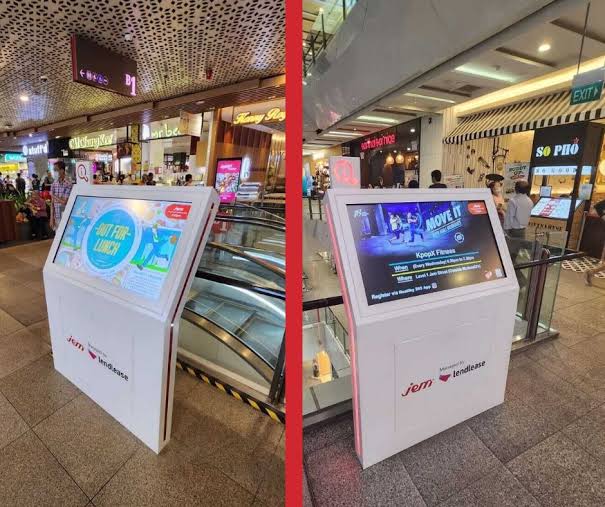
Interactive screens in shops are often installed as decoration, a sign that the brand is modern. Customers ignore those. The kiosks people actually use do one job for them faster than a queue or a search for staff would. For any business weighing up an interactive kiosk singapore retailers and service providers deploy, the starting point is therefore a task, not a screen: what should a visitor be able to finish at this device, and how will anyone know that it is working?
What Counts as a Kiosk
A kiosk is any self-service touchscreen placed in a public or customer area. It ranges from a floor-standing unit with a large display to a tablet-sized touchpoint mounted on a counter or shelf. The small formats are increasingly common because they cost less, fit existing fixtures and can be placed exactly where a decision is made. What defines the category is not the size but the fact that the customer, not the staff member, operates it.
Jobs Kiosks Do Well
The reliable uses are well established. Queue tickets and appointment check-in in clinics and service centres. Ordering and payment in quick-service food outlets. Wayfinding in malls and large buildings. Product lookup, stock checks and extended catalogues in shops with limited floor space. Visitor registration in offices. Feedback collection at exits. Each replaces a repetitive exchange that staff would otherwise handle, and each has a clear end point that tells the customer the task is complete.
Effect on the Customer Experience
The benefit customers notice is control over time. Someone who can check in, order or find an item unaided does not wait for attention, and those who do need a person find staff more available. Kiosks also present information consistently, in several languages if required, which matters in a multilingual city. The effect is not automatic, though. A slow or confusing interface is worse than a queue because the customer fails alone, in public, with nobody to ask.
Choosing the Hardware Format
Format follows the task. A counter-top unit of around ten inches suits check-in, loyalty lookup and feedback. A dual-screen counter model lets staff and customer each see a display during a transaction. Larger floor-standing units suit wayfinding and browsing. Businesses comparing touchscreen touchpoints and specialty displays should consider brightness for the location, particularly near glass frontages, as well as mounting, cable routing, and whether a card reader, scanner or printer has to be attached.
Software Matters More Than the Screen
The device is a shell for an application. Some touchpoints run web-based content in a locked browser; others run custom applications and connect to back-office systems through interfaces. Before buying, establish what will supply the content: the point-of-sale system, an appointment system, a product database or a content management platform. A kiosk showing out-of-date stock or prices does damage quickly, so the data connection and its update frequency deserve as much scrutiny as the hardware specification.
Designing the Interaction
Good kiosk design is restrained. Large touch targets, few steps, plain wording and an obvious way to start again are worth more than animation. The screen should return to its home state after a short period of inactivity so the next person does not inherit someone else’s session. Height and angle should allow use by a seated person. Any personal data entered should be the minimum necessary and cleared at the end of the session.
Placement and Environment
Position determines use. A kiosk at the entrance catches people before they join a queue; one at the back of the shop is found only by accident. There should be room to stand without blocking a walkway, and the screen should not face direct sunlight unless it is built for it. Power and network points need planning before fit-out. A sign stating in a few words what the device does improves uptake more than any design feature.
Running Costs and Upkeep
The purchase price is only part of the commitment. Screens need cleaning daily, software needs updating, and peripherals such as printers need consumables. Someone should be responsible for checking each morning that every unit is on and working, because a dead screen signals neglect. Remote monitoring helps where there are several sites. Ask the supplier about warranty terms, replacement times and whether support covers both the hardware and the software running on it.
Measuring Whether It Works
Decide the measure before installation. For ordering kiosks it may be the share of transactions completed on the device; for check-in, the reduction in counter waiting time; for product lookup, the number of sessions and what was searched. Review after a month and adjust wording, placement or flow. Low use is usually a design or placement problem, not proof that customers dislike self-service. Without a measure, nobody can tell the difference.
Deciding What to Install
Begin with one task that customers already ask staff to do many times a day, and choose the smallest device that handles it properly. Confirm the software and data source first, the hardware second and the mounting third. Pilot in one location, measure, then extend. A business that follows this order avoids the idle screen in the corner. Those at the shortlisting stage can compare formats and specifications across a range of compact interactive displays for customer service before requesting a demonstration.
About the Author